
Starbridge Engineering Labs: How we make bridge tables reactive & handle real-time updates
See the behind-the-scenes on how we build reactive tables at Starbridge.
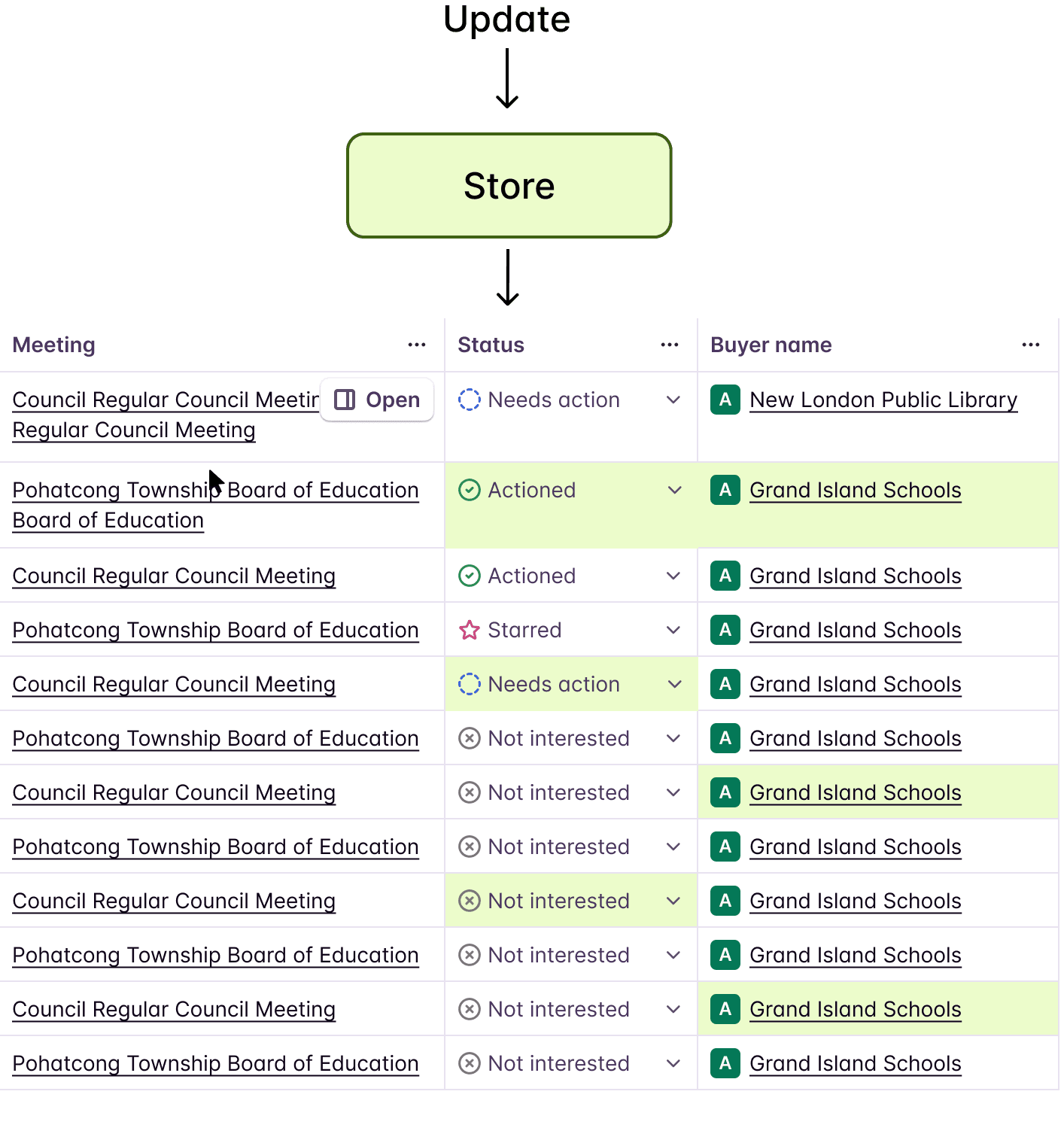
At Starbridge, our Bridge table is the nerve center of the product. It displays hundreds of rows of enriched data — each row representing a buyer, contact, or opportunity — with columns that are continuously updated by AI agents running in the background.
The initial table render is powered by a backend API response — React Query fetches paginated entries and fills every cell with the last known state. But once the table is on screen, Firestore takes over. The frontend subscribes to Firestore collections and receives real-time document changes as AI agents process data. These updates are written into a Zustand store, and each individual cell listens to that store via a fine-grained selector. The cell never talks to Firestore directly — it only reacts to its own slice of the store.
On a busy Bridge, hundreds of cell updates can arrive within seconds. Early on, we hit a wall during performance testing of our alpha version. The table was unusable at scale. Every Firestore update triggered a full re-render of the entire table — hundreds of rows, dozens of columns, thousands of cells. The browser would freeze, animations would stutter, and users on large Bridges would watch their Chrome tabs consume gigabytes of memory.
This is the story of how we made it reactive.
The Immutable Table Problem
Our initial architecture was straightforward. React Query fetches paginated entries from the backend. Firestore subscriptions listen for changes and invalidate the React Query cache. React Query refetches, the table re-renders with new data.
React Query fetch → Full dataset in memory → Render all rows/cells
Firestore update arrives → Invalidate query → Refetch entire page
New data → Full table re-render → Every cell component unmounts/remounts
This works fine for 20 rows and 5 columns. But our Bridges routinely have 200+ rows and 15+ columns. When an AI agent finishes processing a batch, Firestore can deliver 50-100 document changes within a single second. Each change invalidates the query, triggers a refetch, and forces a full re-render.
The math is brutal: 100 updates x 200 rows x 15 columns = 300,000 cell re-renders per second. React’s reconciliation is fast, but not that fast.
The Reactive Architecture
The fix required rethinking how data flows through the table. Instead of one monolithic data pipeline, we split it into two layers:
Layer 1: React Query for Structure
React Query fetches paginated entries and owns the table’s structural data — row order, pagination, entry metadata, entity information. This data changes infrequently (only when the user paginates, filters, or sorts).
Layer 2: Firestore → Zustand Store → Cells
The frontend subscribes to Firestore collections and pushes every document change into a Zustand store. Individual cell components never interact with Firestore — they subscribe to the store using fine-grained selectors keyed by (entryId, phaseId). When Firestore delivers an update, the store patches its internal map, Zustand notifies only the matching selector, and only that one cell re-renders. No React Query invalidation. No refetch. No full re-render.
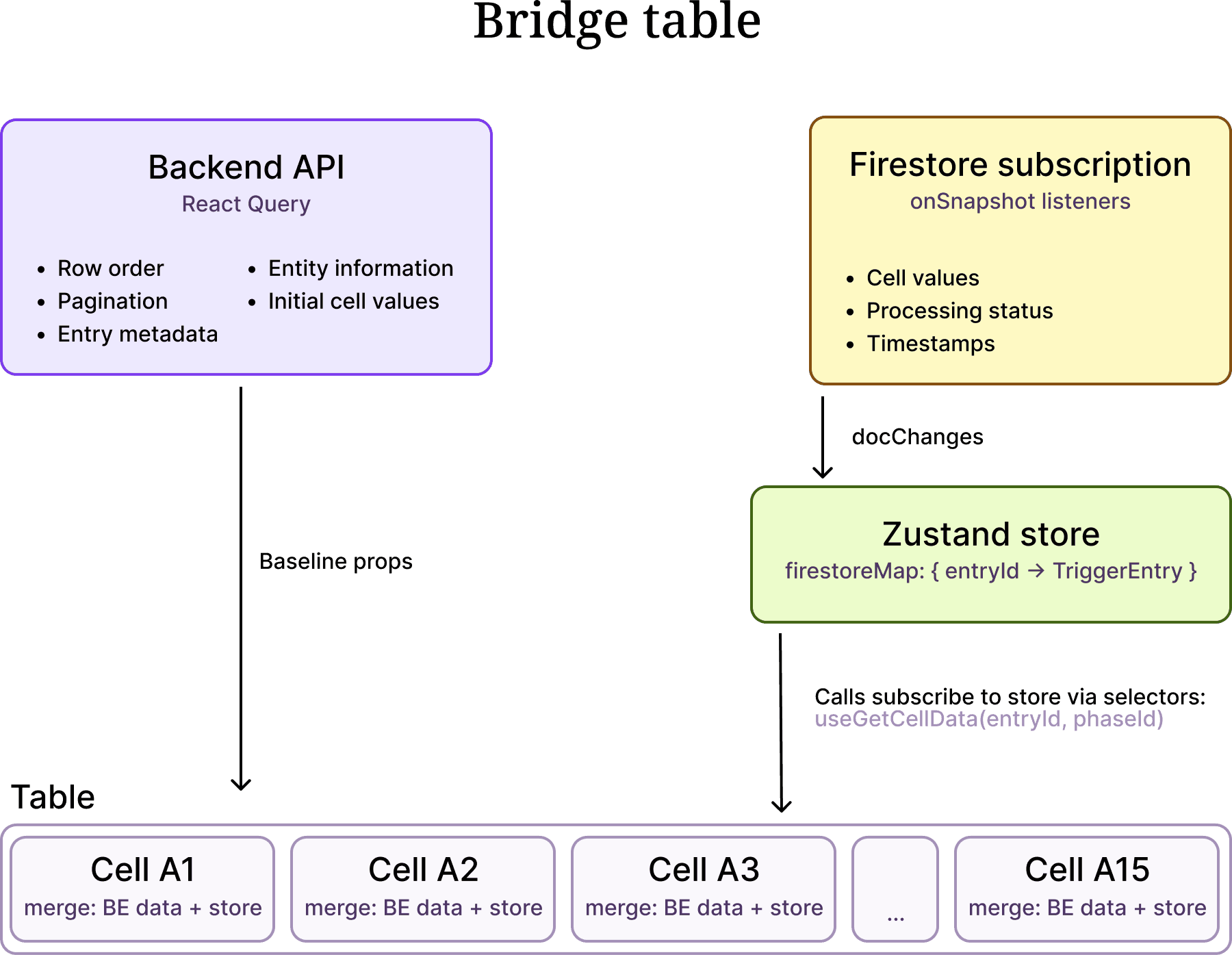
The key insight: React Query and Firestore never compete. React Query handles the slow, structural queries and provides the initial cell values from the backend response. Firestore, subscribed to on the frontend, handles the fast, granular updates and pushes them into the Zustand store. Each cell listens to the store — not to Firestore — through a selector scoped to its own (entryId, phaseId). The store is the single source of truth for live data; cells are just reactive consumers of it.
Why Firestore
We needed a real-time data layer on the frontend that could push updates to the browser the moment an AI agent finishes processing an entry. We evaluated several options — WebSockets, Server-Sent Events, polling — but Firestore won for one reason: it scales infinitely out of the box.
Firestore is a managed, serverless database with built-in real-time subscriptions. We don’t run a WebSocket server. We don’t manage connection pools. We don’t worry about how many concurrent listeners exist across all our users’ browsers. Google handles all of that. When a backend worker writes a result to a Firestore document, every frontend client subscribed to that document receives the update within milliseconds — whether there are 10 concurrent users or 10,000.
This matters for our product because Bridges are collaborative. Multiple team members can view the same Bridge simultaneously while AI agents are processing hundreds of entries. Some of our power users run Bridges with 50,000 items and 20+ columns — that is a million cells, with AI agents continuously writing results into Firestore documents. Every browser tab viewing that Bridge gets live updates pushed to it. With a self-hosted WebSocket solution, we would need to build and scale a pub/sub fanout layer ourselves to handle that volume of concurrent connections and document changes. With Firestore, that entire infrastructure problem disappears.
The tradeoff is that Firestore comes with hard query limitations that force architectural workarounds on the frontend.
Firestore Subscription Batching
The biggest limitation: Firestore’s in operator can query at most 30 document IDs per query. We use batches of 20 for safety margin. This means we cannot create a single real-time subscription for all entries on a page — when a Bridge has 200 entries visible, we need 10 concurrent onSnapshot listeners, each watching a chunk of 20 entry IDs.
This chunking is entirely a Firestore constraint. It adds complexity to our subscription management (deduplication, lifecycle cleanup, stable batch keys), but it is the price we pay for not having to operate our own real-time infrastructure.
Here is our batching logic (simplified):
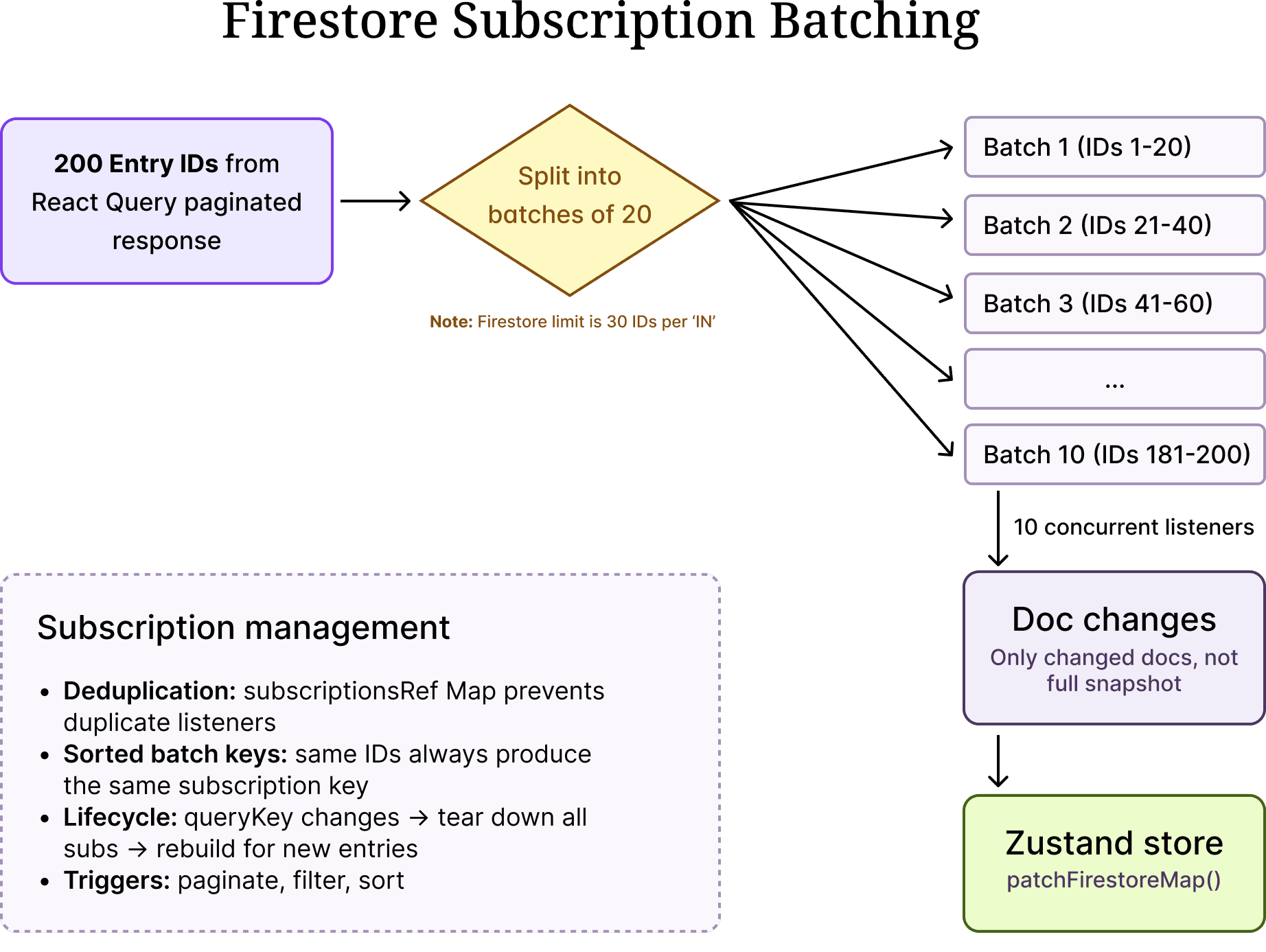
Several things to note here:
- Delta processing with `docChanges()`: We never iterate the full snapshot. Firestore’s docChanges() gives us only what changed since the last callback — this is critical for performance.
- Subscription deduplication: The subscriptionsRef Map prevents duplicate listeners. If the batches haven’t changed (same entry IDs, same order), existing subscriptions are kept alive.
- Lifecycle management: When the query key changes (user paginates or filters), all subscriptions are torn down and rebuilt for the new set of entries. The queryKey dependency on the cleanup effect handles this.
- Sorted batch keys: We sort IDs within each batch so that the same set of IDs always produces the same subscription key, regardless of the order they arrived in.
The Zustand Store: Fine-Grained Reactivity
The Zustand store is where the magic happens. It holds a flat map of entry ID to entry data, and exposes selectors that let individual cells subscribe to exactly the data they need.
type FirestoreMap = Record<string, TriggerEntry>;
const store = create((set, get) => ({
firestoreMap: {},
patchFirestoreMap: (entries) => {
const currentMap = { ...get().firestoreMap };
entries.forEach((entry) => {
currentMap[entry.entryId] = entry;
});
set({ firestoreMap: currentMap });
},
getCellData: (entryId, phaseId) => {
return phaseId
? get().firestoreMap[entryId]?.phases?.[phaseId]
: undefined;
},
}));
// Per-cell selector — only re-renders when THIS cell’s data changes
export const useGetCellData = (entryId, phaseId) => {
return store((state) => state.getCellData(entryId, phaseId));
};
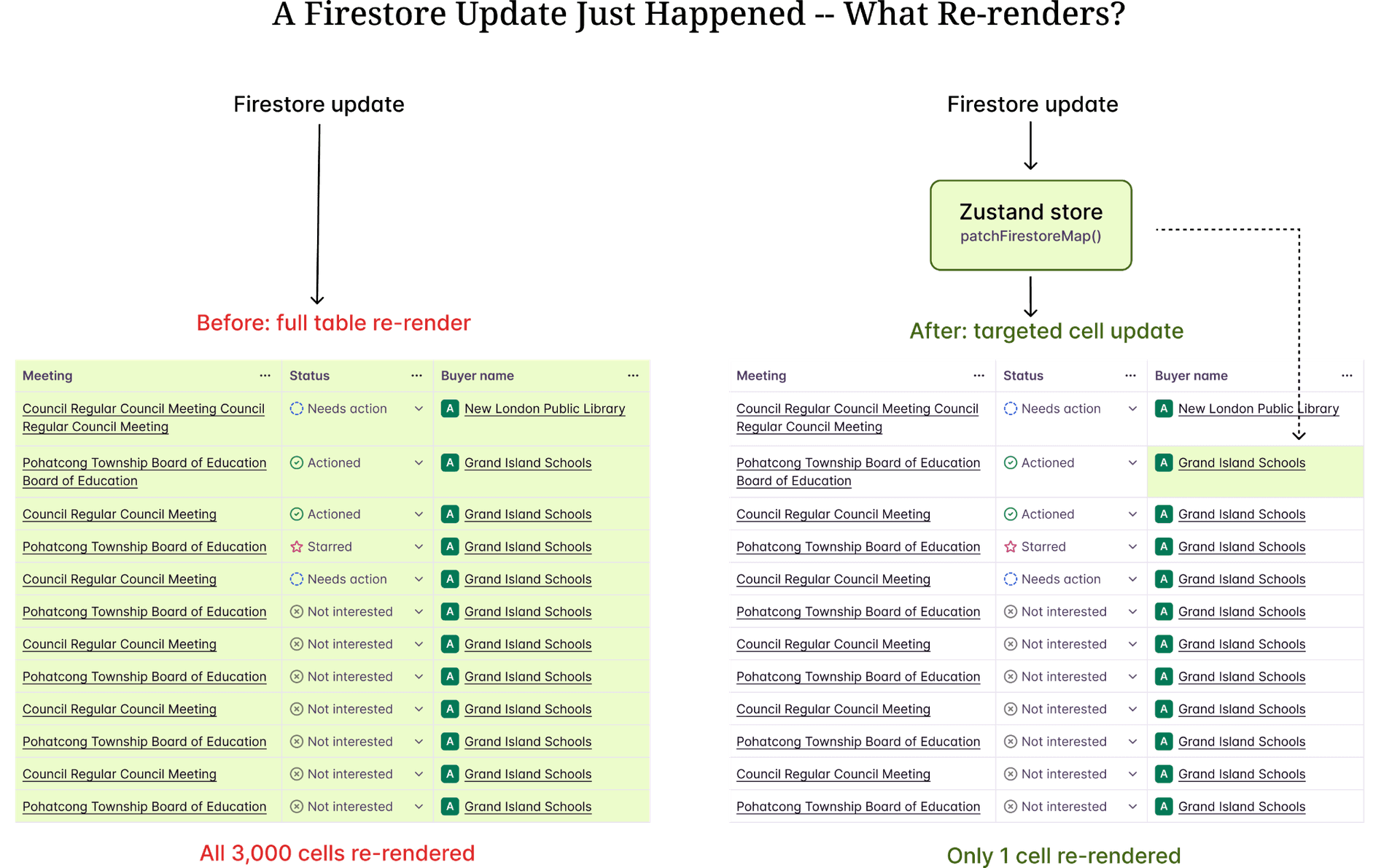
The critical detail is useGetCellData. This is how each cell listens to the store. Zustand’s selector-based subscriptions mean that when Firestore delivers an update for entry “abc” phase “xyz”, the patchFirestoreMap writes it into the store, and only the cell component whose selector matches that exact (entryId, phaseId) pair re-renders. The other 2,999 cells on the page are completely untouched — they never knew the update happened.
This is the difference between O(n*m) and O(1) re-renders per update. One cell changes — one cell re-renders.
The store also tracks aggregate state — which phases have outdated values, which have unprocessed entries — using auxiliary maps that drive header-level UI indicators without touching individual cells.
The Merge Strategy
Each TableCell component merges two data sources: the backend API response delivered via React Query (which fills the initial render) and the Zustand store populated by Firestore subscriptions (which provides live updates).
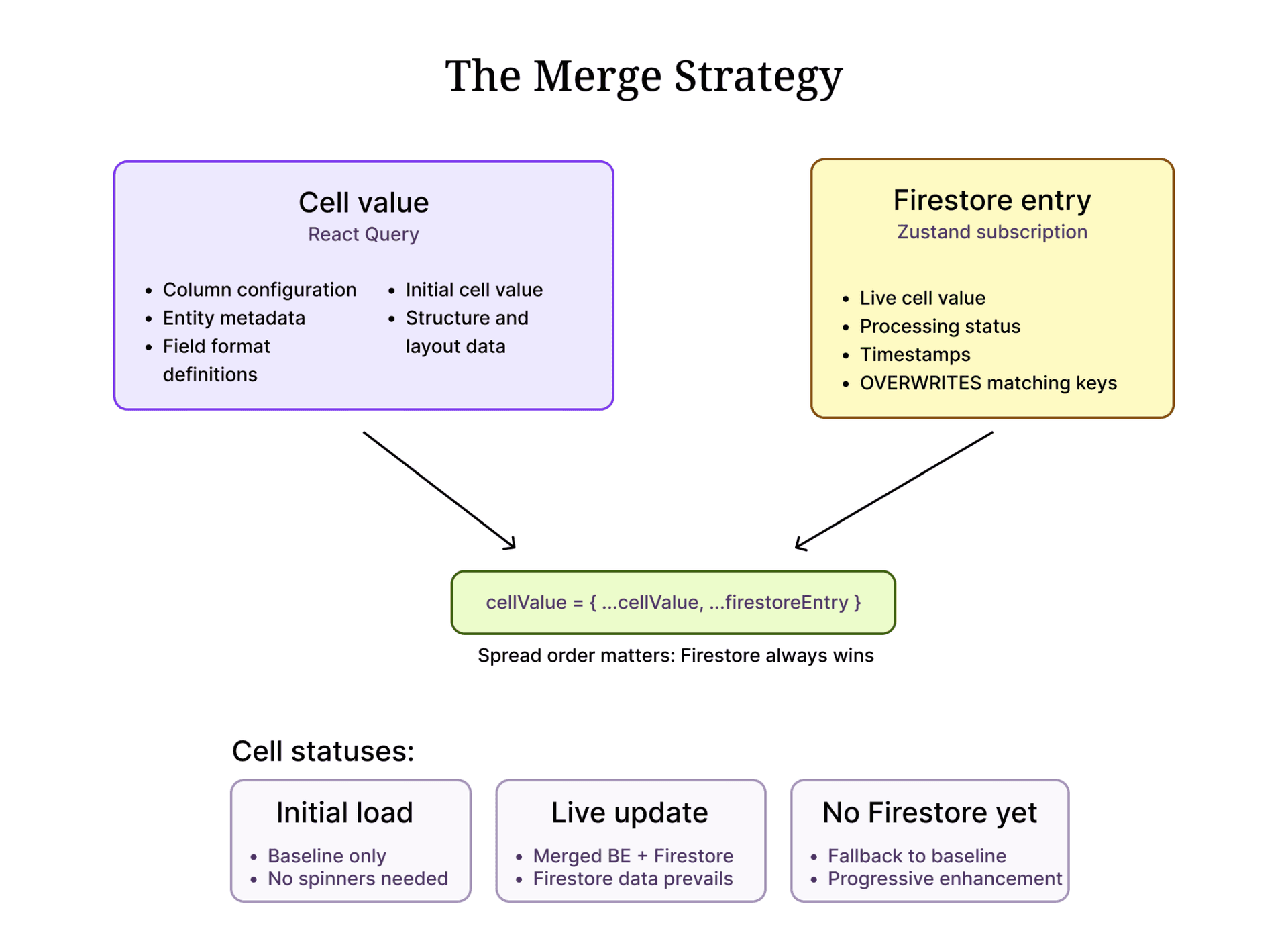
The spread order matters: {..._cellValue, ...firestoreEntryPhase}. Firestore data always wins when both sources have a value for the same key. But React Query provides the fallback for structural fields that Firestore doesn’t carry (column configuration, entity metadata, field format definitions).
This pattern means:
- On initial load, cells render immediately with data from the backend API response (via React Query). The table is fully populated before any Firestore subscription fires.
- As Firestore updates arrive on the frontend, they are written into the Zustand store. Each cell’s selector picks up its own update and re-renders with the live value.
- If Firestore hasn’t delivered data for a cell yet, the backend initial values are shown — no empty states, no loading spinners for individual cells.
Memoization at Every Level
Reactivity only works if we prevent unnecessary re-renders at every level of the component tree. Here is our memoization strategy:
- Cell level: Every TableCell is wrapped in React.memo. It only re-renders when its props change or its Zustand selector returns a new value.
- Column definitions: Column definitions are memoized with useMemo and use a stringified dependency key. This prevents TanStack Table from recalculating columns on every render.
- Stable callbacks: All event handlers passed to cells (processPhases, selectCell, handleSelectChange) are wrapped in useCallback with minimal dependency arrays.
- Zustand selectors: useGetCellData(entryId, phaseId) creates a selector that returns the exact same reference if the underlying data hasn’t changed. Zustand uses Object.is equality by default, so primitive values and unchanged object references don’t trigger re-renders.
- Table component: The table component itself is memoized, preventing re-renders from parent state changes (like sidebar toggles or modal opens).
The combination of these layers means that when a Firestore update arrives for one entry, the re-render path is:
Firestore callback → patchFirestoreMap() → Zustand notifies subscribers
→ Only cells with matching (entryId, phaseId) re-render
→ React.memo blocks propagation to child components with unchanged props
Total components re-rendered: 1 cell. Not 3,000.
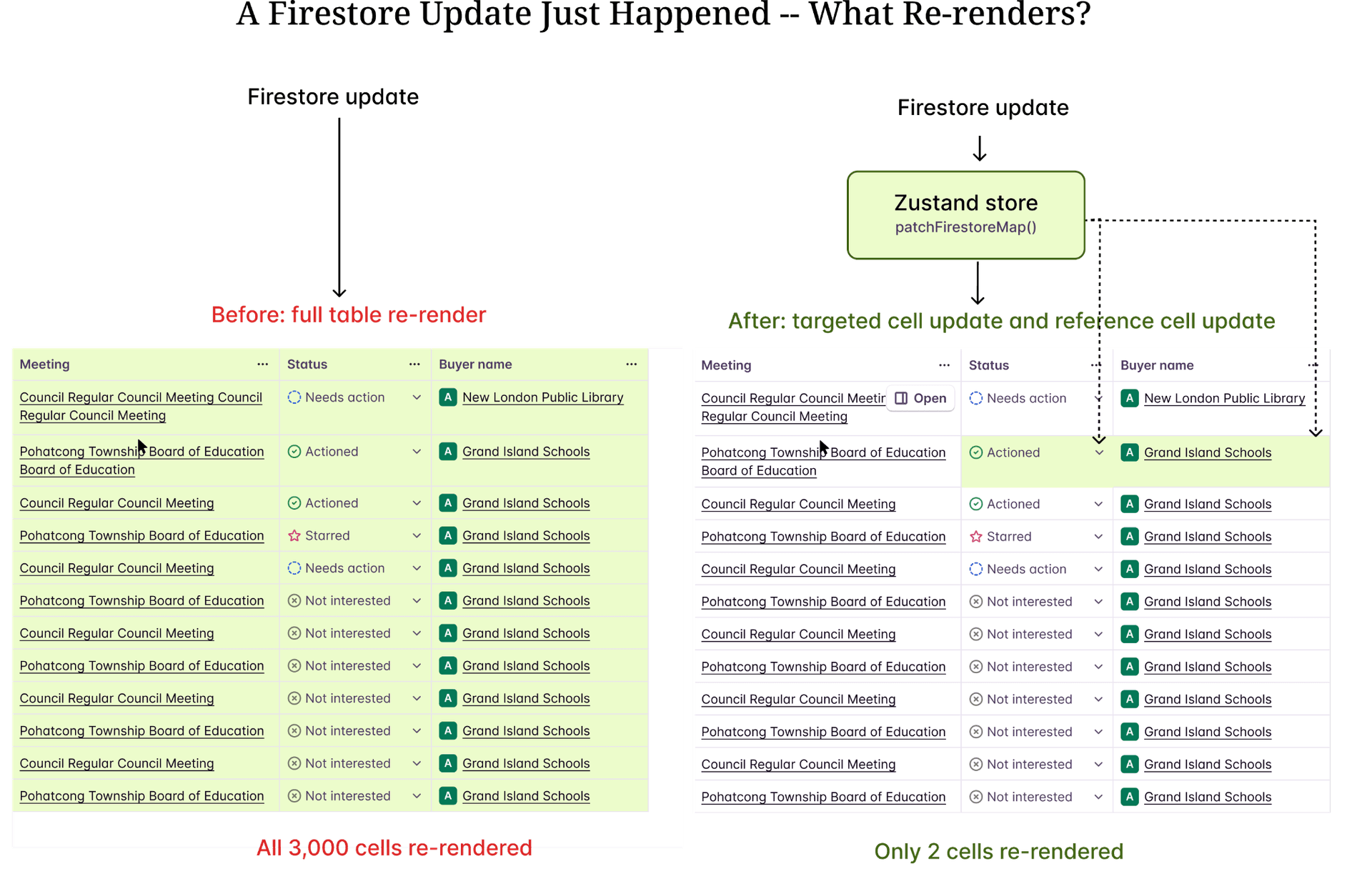
The centralized store also unlocks cascading cell updates — when one cell’s value changes, other cells that reference it can react automatically. Because every cell reads from the same Zustand store, a single write can trigger targeted re-renders across multiple dependent cells without any prop drilling or manual coordination. This is where a centralized, selector-driven store becomes a major architectural advantage over component-local state.
Results and Lessons Learned
After shipping the reactive architecture:
- Table responsiveness improved dramatically. Users on Bridges with 200+ entries and 15+ columns can now watch cells update in real-time without any perceptible lag.
- Memory usage dropped significantly. No more redundant full-dataset copies from React Query refetches.
- Firestore costs decreased because we stopped triggering unnecessary backend refetches on every document change.
Key takeaways:
- Separate structure from content. React Query is excellent for paginated, structural data that changes infrequently. Real-time data needs a different path.
- Zustand’s selector model is perfect for fine-grained reactivity. Unlike React Context (which re-renders all consumers on any change), Zustand selectors let you subscribe to exactly the slice of state you need.
- Firestore gives you infinite scale but not infinite flexibility. You get managed real-time subscriptions without running any infrastructure — but you pay for it with hard query limits (30 IDs per in clause) that force chunking logic on the client. Know the tradeoffs upfront.
- Firestore’s `docChanges()` is essential. Processing the full snapshot on every callback defeats the purpose of real-time subscriptions. Always use delta processing.
- Memorization is not optional. In a reactive system, every unnecessary re-render cascades. React.memo, useMemo, and useCallback are not premature optimizations — they are architectural requirements.
- The merge pattern (`{...baseline, ...realtime}`) is simple but powerful. It provides progressive enhancement (baseline data until real-time kicks in) and clear ownership (each source owns specific fields).
Building reactive tables at scale is not about finding one silver bullet. It is about layering multiple optimizations — batched subscriptions, fine-grained stores, strategic memoization, delta processing — so that each update touches the minimum possible surface area in your component tree.
Explore our use case library
 Automate account research with AI agentsStop manually researching accounts. Starbridge AI agents automate account research by monitoring buying signals 24/7 and surfacing the right contacts.
 Identify competitor contract expiration datesThe RFP is usually a formality. Starbridge surfaces competitor contract expiration dates so your reps reach accounts before the renewal cycle closes.
 Create a conference campaignTurn conference badge scans into pipeline. Import your contact list, surface buying signals across every account you met, and follow up with context.